Guide
How to Read an Earthquake Map: Magnitude, Depth, Alerts
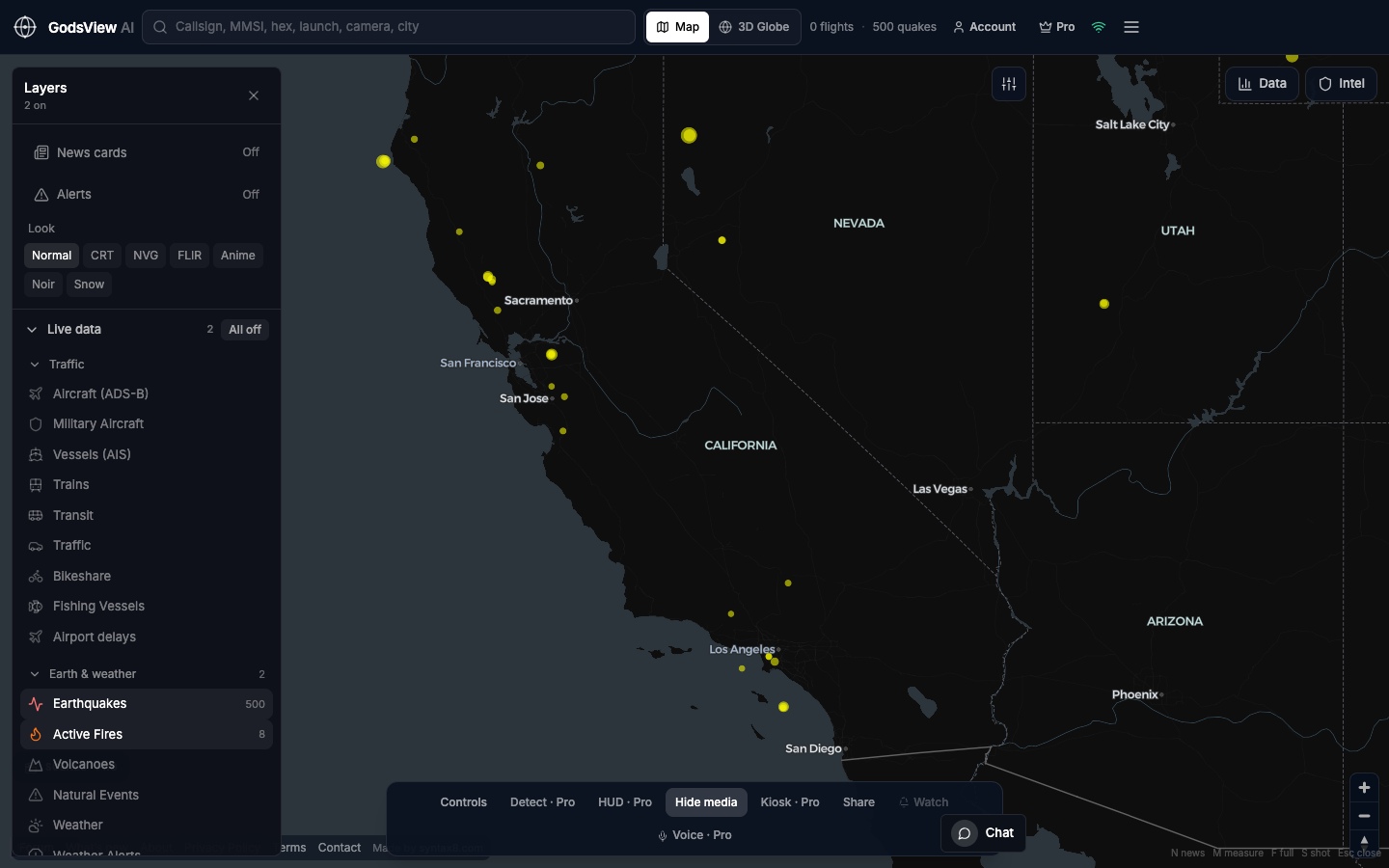
Each circle on an earthquake map carries a magnitude, a depth, a time and a review status. Knowing what each one means, and how often it changes, turns a scatter of dots into useful information.
Key takeaways
- Magnitude is logarithmic: each whole step means about ten times more ground-motion amplitude and about 32 times more energy.
- Magnitude describes the earthquake; intensity describes the shaking at a place, so one quake has one magnitude but many intensities.
- Early USGS solutions are automatic and often revised; a reviewed status means a seismologist has checked the event.
- PAGER colors estimate likely fatalities and economic losses, not shaking strength.
- The USGS tsunami flag is not a tsunami warning; official alerts come from NOAA tsunami warning centers.
To read an earthquake map, look at four things for each event: magnitude (how much energy was released), depth (how far below the surface it started), time (how recent it is), and review status (whether a seismologist has checked it yet). Most live maps size circles by magnitude and color them by age or depth, so the biggest and freshest events stand out first.
The details are where people get caught out. A magnitude can change in the first hour. Two agencies can publish different numbers for the same quake. A "tsunami" flag can appear on an event that produced no tsunami at all. None of that means the data is wrong; it means you are reading a scientific product that is updated as more evidence arrives.
This guide walks through magnitude types, intensity and ShakeMap, depth, automatic versus reviewed solutions, USGS PAGER alert colors, aftershock forecasts and tsunami messages, then shows how to use the earthquake layer on GodsView AI and what an earthquake map cannot tell you.
What does an earthquake map show?
A typical live earthquake map plots the epicenter, the point on the surface directly above where the rupture began. The circle size usually reflects magnitude. The color usually reflects either how recently the event happened or how deep it was, and the legend tells you which.
Most global maps, including the GodsView layer, are built on the USGS real-time earthquake feeds. USGS offers feeds for the past hour, day, 7 days and 30 days, at thresholds from "all earthquakes" up to "significant", and states that the feeds update every minute. GodsView checks the USGS feed about every two minutes.
The fields behind each dot
| Field | What it means | How to use it |
|---|---|---|
| Magnitude and type | Size of the earthquake and the method used (for example Mww or ML) | Compare like with like; larger types are more reliable for big events |
| Depth | Depth of the hypocenter in kilometers | Shallow quakes usually shake the surface harder than deep ones of the same size |
| Time | Origin time, usually shown in UTC and converted to your time zone | Freshest events are the ones most likely to be revised |
| Status | Automatic or reviewed | Treat automatic solutions as provisional |
| Felt reports | Count of "Did You Feel It?" responses | A quick signal that people noticed shaking |
| PAGER alert | Estimated impact level (green, yellow, orange, red) | A first estimate of human and economic impact |
| Tsunami flag | Large event in an oceanic region | A pointer to NOAA, not a warning in itself |
What does earthquake magnitude mean?
Magnitude is a single number describing the size of an earthquake at its source. The scale is logarithmic. The USGS explains that each whole-number increase represents a tenfold increase in measured amplitude on a seismogram and roughly 32 times more energy released.
That means an M6.0 earthquake releases about 32 times the energy of an M5.0, and about 1,000 times the energy of an M4.0. A change from M6.8 to M7.1 in an update sounds small but is a meaningful increase in size.
Why are there different magnitude types?
Different methods measure different seismic waves over different frequency bands and distances, so they give somewhat different answers for the same event. The USGS magnitude types page lists the main ones:
| Type | Name | Typical use |
|---|---|---|
| Mww | Moment W-phase | M5.0 and larger; the authoritative USGS magnitude when available |
| Mwc, Mwb, Mwr | Other moment magnitudes | Centroid, body-wave and regional moment solutions for specific size and distance ranges |
| Ms | Surface-wave magnitude | Roughly M5.0 to 8.5; saturates for the very largest quakes |
| mb | Short-period body-wave | Roughly M4.0 to 6.5 worldwide; saturates around M6.5 |
| ML | Local (Richter) magnitude | Small, local earthquakes; the original 1935 scale |
| Md | Duration magnitude | Very small events, based on how long the signal lasts |
"Saturates" means the method stops growing with the true size of a large quake. That is why the first number for a big event can rise once a moment magnitude (Mw) is calculated. When you compare earthquakes, compare moment magnitudes where possible.
Magnitude vs intensity: what is the difference?
Intensity describes the strength of shaking at a particular place. One earthquake has one magnitude but many intensities, which depend mostly on distance from the rupture, local geology and depth. In the United States, intensity is expressed on the Modified Mercalli Intensity (MMI) scale in Roman numerals, such as VI or VIII.
Two USGS products map intensity:
- ShakeMap produces near-real-time maps of ground motion and shaking intensity after significant earthquakes, combining instrument readings with models.
- Did You Feel It? collects reports from people who felt an earthquake and maps what they experienced.
If you want to know "how bad was it here?", intensity is the right question, and ShakeMap or Did You Feel It? is the right place to look. Magnitude alone cannot answer it.
How deep was the earthquake, and why does depth matter?
Depth is measured to the hypocenter, the point underground where the rupture began. The USGS groups depths into three zones: shallow (0 to 70 kilometers), intermediate (70 to 300 kilometers) and deep (300 to 700 kilometers).
As a rule of thumb, shallow earthquakes of a given magnitude tend to cause stronger shaking at the surface directly above them, because the energy has less distance to travel. Deep earthquakes are often felt over a wider area but less intensely. Depth is also one of the harder values to pin down, so check the depth uncertainty if your source shows it, and expect the number to move in early updates.
Automatic vs reviewed: why earthquake numbers change
Every event in the USGS catalog has a status. According to the ComCat documentation, an automatic event was posted directly by automated processing and has not been checked by a person, while a reviewed event has been looked at by a human. A third value, deleted, marks events that have been removed from the catalog.
This explains most of the surprises people notice on a live map:
- A small automatic event appears within minutes of the quake.
- More stations report, and the location and magnitude are recalculated.
- For larger quakes, a moment magnitude replaces an early body-wave or local magnitude.
- A seismologist reviews the solution and the status changes to reviewed.
- Occasionally an automatic event is deleted from the catalog.
The practical rule: treat the first number as a draft. If you are reporting on an earthquake, cite the time you checked and the status at that time. Our guide for journalists using live maps covers this habit in more detail.
What do USGS PAGER alert colors mean?
PAGER (Prompt Assessment of Global Earthquakes for Response) estimates the likely human and economic impact of a significant earthquake. USGS says results are generally available within about 30 minutes, and that estimates improve as more data arrives. The alert level is set by whichever estimate, fatalities or economic losses, is higher:
| PAGER level | Estimated fatalities | Estimated economic losses (USD) |
|---|---|---|
| Green | 0 | Less than $1 million |
| Yellow | 1 to 99 | $1 million to $100 million |
| Orange | 100 to 999 | $100 million to $1 billion |
| Red | 1,000 or more | $1 billion or more |
PAGER colors are about impact, not shaking strength. A strong earthquake in a remote area can be green, while a moderate one under a dense city with vulnerable buildings can be orange. Read the color together with the ShakeMap.
How to read an aftershock forecast
Aftershocks follow most significant earthquakes. The USGS aftershock forecast gives the expected number of felt aftershocks (M3 and M4 and larger), the probability of potentially damaging aftershocks (M5 and larger), and the probability of a moderate to large earthquake (M6 or M7 and larger). Forecasts are posted for M4.0 and larger events in the continental United States and M5.0 and larger elsewhere, after a wait of at least 20 minutes, and are updated as the sequence develops.
Three patterns drive those forecasts, according to USGS: larger mainshocks produce more aftershocks, aftershock rates fall over time in a predictable way, and the mix of aftershock sizes stays roughly constant. On a map, that usually looks like a dense cluster of small events around the mainshock that thins out over days and weeks. A forecast is a probability, not a prediction of a specific time or place.
See earthquakes in the Ops Center
Does a big earthquake mean a tsunami?
Not necessarily. The USGS feed includes a tsunami flag that is set for large events in oceanic regions. The ComCat documentation states plainly that the existence or value of this flag does not indicate whether a tsunami actually happened or will happen. It exists to point you to the authoritative source.
In the United States that source is NOAA's tsunami warning centers. The National Weather Service uses four message levels:
- Tsunami warning: a tsunami that may cause widespread flooding is expected or occurring.
- Tsunami advisory: strong currents or dangerous waves are expected for people in or very near the water.
- Tsunami watch: a distant earthquake has occurred and a tsunami is possible.
- Information statement: an earthquake has occurred, but there is no threat or the threat has not yet been determined.
If you are near a coast and feel strong shaking, follow local official guidance immediately. Do not wait for a map to update.
How to use the earthquake layer on GodsView
- Open the live earthquake map, or turn on the earthquake layer from the main map or the 3D globe.
- Click any event to see its magnitude, depth and time, then look up the same event on the USGS site for ShakeMap, PAGER and review status.
- Turn on GDACS disaster alerts (updated about every 15 minutes) and tsunami alerts for a wider hazard picture; both are free.
- Check the Ops Center, which lists USGS M4.5+ events in its incident register alongside GDACS and other sources, and scores each incident from 0 to 100. The Ops Center guide explains the scoring.
- With GodsView Pro, set alerts for M4.5+ earthquakes, delivered in-app, by browser push or email.
Earthquakes are one of several Earth layers. NASA FIRMS active fires sit on the same map, explained in our FIRMS wildfire map guide, and the events desk collects broader natural-hazard events.
What an earthquake map cannot tell you
An earthquake map is a fast, well-sourced summary, but it has clear limits.
- It does not predict earthquakes. No public map can tell you when or where the next large quake will happen. Aftershock forecasts are probabilities for a sequence that has already started.
- Early numbers are provisional. Magnitude, location and depth are often revised in the first hour.
- Magnitude is not damage. Damage depends on intensity, building quality and population, which is why PAGER and ShakeMap exist.
- Coverage varies. Small earthquakes are detected far better where seismic networks are dense than in remote regions or the open ocean, so the absence of small dots does not mean the absence of small quakes.
- It is not an alert system. Maps refresh on a cycle. For safety decisions, follow your national seismic agency, emergency management office and NOAA or local tsunami services.
The same habits of checking source, time and status apply to every live dataset. If you are using maps for research, our guide to what OSINT is and the explainer on how live conflict maps work cover verification in more depth. All feeds GodsView uses are listed on the methodology page.
Where to start
Start with the four basics: magnitude, depth, time and status. Then, for any event that matters to you, open its USGS page and check the moment magnitude, the ShakeMap for local shaking, the PAGER color for likely impact and, for coastal events, the NOAA tsunami messages. Treat automatic solutions as drafts and expect revisions.
When you want the global picture at a glance, open the live earthquake map and compare the latest events with fires and alerts on the same view.
Frequently asked questions
What do the colors on an earthquake map mean?
It depends on the map, so check the legend. Most live maps color earthquakes by age (how many hours or days ago they occurred) or by depth, and size the circle by magnitude. USGS PAGER uses a separate color scale (green, yellow, orange, red) for estimated fatalities and economic losses, which is about impact rather than shaking strength.
Why did the earthquake magnitude change after it was first reported?
Early magnitudes come from automatic processing with limited data. As more stations report, USGS recalculates the location and size, and for larger events replaces early body-wave or local magnitudes with a moment magnitude such as Mww, which does not saturate. Changes of a few tenths are common. Events marked "reviewed" have been checked by a seismologist.
Is a magnitude 5 earthquake twice as strong as a magnitude 4?
No. The magnitude scale is logarithmic. According to USGS, each whole-number step means about ten times more measured ground-motion amplitude and roughly 32 times more energy released. So an M5 releases about 32 times the energy of an M4, and an M6 about 1,000 times the energy of an M4.
Does the USGS tsunami flag mean a tsunami is coming?
No. USGS sets the flag for large earthquakes in oceanic regions and states that it does not indicate whether a tsunami occurred or will occur. It links to NOAA, which issues official tsunami warnings, advisories, watches and information statements through its tsunami warning centers. If you feel strong shaking near a coast, follow local official guidance immediately.
How often does the GodsView earthquake map update?
GodsView checks the USGS earthquake feed about every two minutes, and USGS says its feeds update every minute. The earthquake layer, GDACS disaster alerts and tsunami alerts are free on the live earthquake map. GodsView Pro adds alerts for M4.5+ earthquakes by in-app notification, browser push or email.
Sources
- USGS — Real-time earthquake GeoJSON feeds
- USGS — Earthquake magnitude, energy release and shaking intensity
- USGS — Magnitude types
- USGS — Determining the depth of an earthquake
- USGS — ANSS Comprehensive Earthquake Catalog (ComCat) documentation
- USGS — ShakeMap
- USGS — Did You Feel It?
- USGS — PAGER background
- USGS — Aftershock forecast overview
- National Weather Service — Tsunami alerts