How-to
What's Flying Over My House Right Now? How to Find Out
You hear a jet, you look up, you wonder where it is going. A live flight map can tell you in about ten seconds, if you know which way to look and how to match the dot on the screen to the plane in the sky.
Key takeaways
- Open the What's overhead page, share your location or type a town, and you get the aircraft within 60 km, closest first.
- Each plane comes with a compass direction and an angle above the horizon. A plane at 60 degrees is high overhead; one at 2 degrees is near the horizon.
- Distance on the list is ground distance. A jet 4 km away at 30,000 ft is roughly 9 km from you in a straight line.
- Most airliners show up. Some military, police, private and older light aircraft do not broadcast ADS-B or have their identity hidden.
- The same page lists ISS, Chinese space station and Hubble passes for the next 24 hours and tells you which ones you can actually see.
To find out what is flying over your house right now, open a live flight map centered on where you are, look for the aircraft closest to you, and match it by direction and height. On GodsView there's a page that does the matching for you: What's overhead. Share your location or type your town, and it lists every aircraft within 60 km with the direction to look and how high above the horizon it is.
I live under a busy approach path, so I use it a lot. Here's how it works, how to read it, and why it sometimes can't tell you about the plane you are staring at.
Step one: tell the map where you are
Open /overhead. You can press Use my location and allow the browser to share it, or type a town or address into the box and press Go. The page doesn't need an account. It refreshes every 15 seconds, and there's an Update button if you want a fresh fix right now.
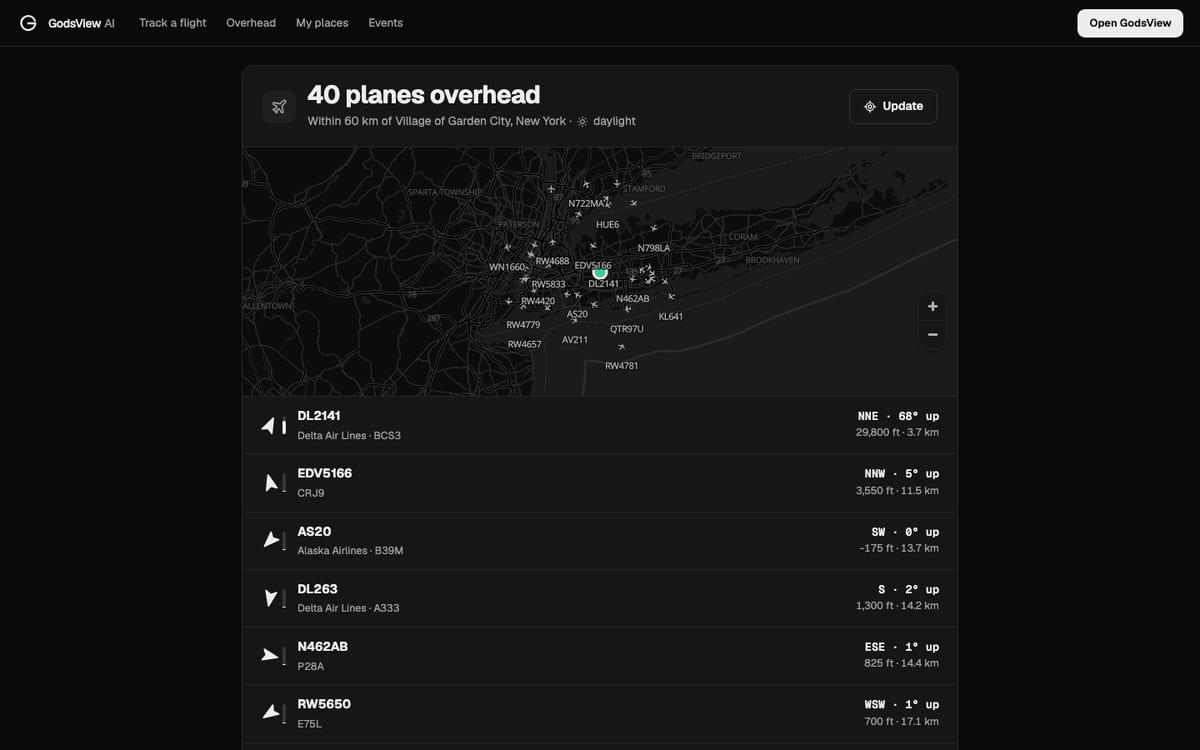
When I type Garden City, New York, on a Saturday afternoon, the header reads "40 planes overhead · Within 60 km of Village of Garden City, New York · daylight". That's a lot of aircraft, because Garden City sits between JFK, LaGuardia and the busy airspace over Long Island. In most places you'll see far fewer.
How to match a plane on screen to the one in the sky
Each row tells you four things. Here is the top row from my screenshot:
| Field | Example | What it tells you |
|---|---|---|
| Callsign and airline | DL2141 · Delta Air Lines · BCS3 | The flight, the airline and the aircraft type code (BCS3 is an Airbus A220-300) |
| Direction | NNE | Which way to face to see it |
| Angle above the horizon | 68° up | How high to look: 90° is straight up, 0° is the horizon |
| Altitude and distance | 29,800 ft · 3.7 km | How high it is flying and how far away the point under it is |
So DL2141 is almost overhead: face north-northeast and look most of the way up. That matches a small, quiet contrail high in the sky. The next row, EDV5166, is a regional jet at 3,550 ft, 11.5 km away, only 5° above the horizon. That's the low, loud one you hear coming into LaGuardia.
The angle is the most useful number and the one most flight maps don't show. Two planes can both be "5 km away" on a map, but one is at 2,000 ft and roars over the rooftops while the other is at 38,000 ft and is a speck. The angle tells you which one you are actually looking at.
The list only shows aircraft in the air, closest first, up to twenty rows. Planes parked at the airport are left out, since you can't see them from your garden anyway.
Read the flight details
Tap any row on the overhead list and it opens that flight's own page. Or click any plane on the live map to get the full card: route, airline, registration, type, altitude, speed and heading. On the map card, the Route tab shows the estimated departure, the ETA and the distance flown and left.
If you know the flight number, skip all that and type it into Track a flight. You get the departure and arrival airports, gates, delay, altitude, speed, distance to go and landing time, plus a share link you can send to whoever is waiting at the airport. For a full walkthrough, including the 3D chase camera, see the flight tracking tutorial.
Why some planes never show up
Sometimes you hear a helicopter circling for twenty minutes and it's not on the list. That is normal. Live maps like GodsView are built mainly on ADS-B, a signal aircraft broadcast with their position, altitude and identity. If you want the technical background, how ADS-B flight tracking works covers it in depth. The short version of why a plane can be missing:
- It doesn't broadcast ADS-B. In the US, ADS-B Out is required in most controlled airspace (FAA), but many light aircraft flying low outside that airspace don't carry it, and outside the US the rules vary.
- It is military. Some military aircraft broadcast and many don't, especially on operations. When they do, GodsView marks them Military in the list. More on that in military aircraft tracking explained.
- Its identity is hidden. The FAA's LADD program lets owners ask for their aircraft to be kept off public data feeds (FAA LADD). Some still appear on the map with a privacy-protected identity, so you see a position but not a name.
- No receiver hears it. Low aircraft in valleys and rural areas can sit below the line of sight of every volunteer receiver nearby. They pop in and out.
So "not on the list" doesn't mean "not real". It means nobody's receiver picked up a public signal from it.
Ground distance vs how far away it really is
The distance on the list is measured along the ground to the point under the plane. For a low aircraft that's close to the real distance. For a cruising jet it isn't. A plane at 30,000 ft (about 9 km up) that's 4 km away along the ground is roughly 10 km from you in a straight line. That's why jets that look "right above you" on a map can look small and slow in the sky.
The angle above the horizon already accounts for this. If the list says 68° up, look 68° up.
Satellites over you tonight
Scroll down on the same page and you'll find Satellites over you · next 24 h. It lists passes of the International Space Station, China's space station and the Hubble Space Telescope over your location, with times, the direction they come from and go to, and the highest point they reach.
Each pass gets a label:
- Visible: the satellite is lit by the sun while your sky is dark. This is the one to go outside for. It looks like a steady, bright star moving across the sky with no blinking lights.
- In shadow: the satellite is in Earth's shadow, so you can't see it even though it's above you.
- Daylight: your sky is too bright.
For Garden City tonight, the page says Hubble climbs to 12° in the south at 6:35 PM and the Chinese station goes almost overhead, 73°, a few minutes before 7 PM. If you want the long explanation of how those times are calculated from orbital elements, read how satellite tracking works. NASA also runs Spot the Station for the ISS if you want sighting alerts by email.
What you can do once you've found it
Most of the time, finding the plane is the whole point. If you want more:
- Follow it. On the map card press Follow to keep it centered while it flies.
- Watch it in 3D. Track in 3D puts you behind the aircraft with a chase camera, and Ride along in 3D puts you in the cockpit. Both need GodsView Plus or Pro.
- Get alerts about it. On a flight page, Get alerts for this flight tells you about gate changes, delays, take-off and landing. Alerts need a paid plan.
- Share it. Every flight page and the overhead page have a share row with Copy link, WhatsApp, X and Telegram.
And if what you really want is to know about anything unusual near your home, not just planes, set up My places. It watches for earthquakes, storms, floods, wildfires and bad air within 50 km of the places you care about.
Frequently asked questions
How can I tell what plane is flying over my house right now?
Open What's overhead, share your location or type your town, and look at the top of the list. Match the plane by the compass direction and the angle above the horizon, then tap the row for the route, gates and landing time.
Why is the plane I can see not on the flight tracker?
It may not broadcast ADS-B, it may be a military or privacy-protected aircraft, or no receiver near you can hear it. Low helicopters and light aircraft are the most common gaps.
Is the overhead page free?
Yes. The page works without an account. Extras such as the 3D chase view and flight alerts need a paid plan.
What does "68° up" mean?
It is the angle above the horizon where you will find the plane. 0° is the horizon and 90° is straight above your head.
Can I see the International Space Station from my house?
Often, yes. The satellites section of the overhead page lists ISS passes for the next 24 hours. Look for passes marked Visible: they happen when the station is sunlit and your sky is dark, usually shortly after sunset or before sunrise.
Sources
- FAA: Automatic Dependent Surveillance-Broadcast (ADS-B)
- FAA: Limiting Aircraft Data Displayed (LADD)
- NASA: Spot the Station
- ICAO: Aircraft type designators (Doc 8643)
Facts checked on against each provider's own site.