How-to
How to Get Earthquake and Disaster Alerts Near Home
Most of us have someone we worry about in a place that shakes, burns or floods. Here is how to get told when something happens near them, without checking the news ten times a day.
Key takeaways
- Add a place on My places (your home, your parents, a kid at college) and GodsView watches 50 km around it.
- It checks for M4.5+ earthquakes, US severe weather warnings, GDACS disaster alerts, tropical cyclones, wildfires, floods, fire hotspots and unhealthy air.
- For a coastline, a city or a commute, draw your own watch area on the map with a circle or a shape.
- Alerts land in the bell in the app, and optionally as browser notifications and email. Quiet hours hold back everything except critical alerts.
- Checking a place is free. Watching it and getting alerts needs a paid plan.
My parents live a long way from me, in a place with real earthquakes. For years my system was: see a headline, panic, call them. Now I get a message when something actually happens near their town, and nothing when it doesn't. This guide is how to set that up for your own people on GodsView.
There are two ways to do it. My places is the quick one: you add a town, pick who lives there, and you're done. A watch area is the flexible one: you draw any shape on the map and choose exactly what to be alerted about.
What GodsView watches near a place
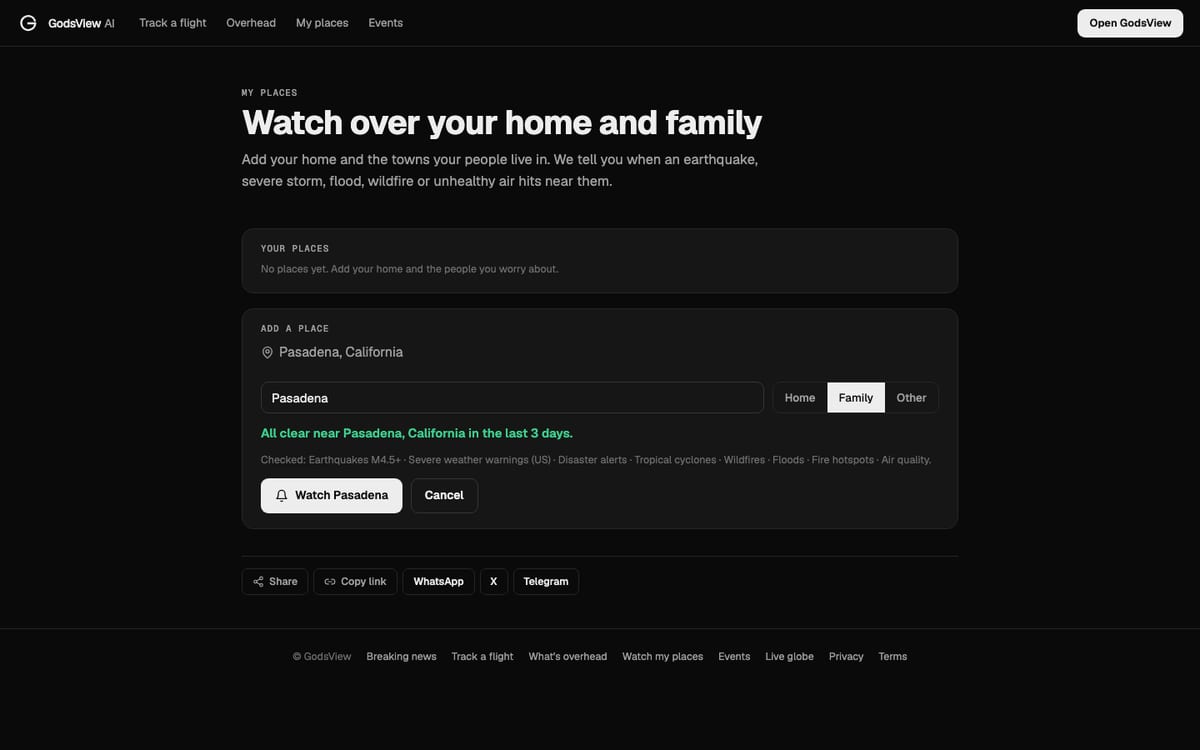
When you add a place, GodsView looks at the last three days around it right away and tells you if anything happened. When I add Pasadena, California, it says "All clear near Pasadena, California in the last 3 days" and lists what it checked.
Here is what it checks and where the data comes from:
| Hazard | What triggers it | Source |
|---|---|---|
| Earthquakes | Magnitude 4.5 or higher | US Geological Survey |
| Severe weather | Official warnings (US only) | US National Weather Service |
| Disaster alerts | Earthquakes, floods, cyclones and more rated by impact | GDACS |
| Tropical cyclones | Hurricanes, typhoons and cyclones | NHC, JTWC and GDACS |
| Wildfires and fire hotspots | Wildfire alerts and satellite fire detections | GDACS and NASA FIRMS |
| Floods | Flood alerts | GDACS |
| Air quality | Unhealthy PM2.5 readings | Air quality sensor networks |
The methodology page lists every source with its refresh rate. If you want to understand the hazards themselves, start with how to read an earthquake map and the NASA FIRMS wildfire guide.
Add your home and family on My places
- Go to My places.
- Under Add a place, press Use my location for where you are now, or type a town in the box ("where your parents live, your kid's college…") and press Add.
- Give it a name. Keep it short: "Mum and Dad", "Pasadena", "Sam's dorm".
- Pick Home, Family or Other.
- Press Watch followed by the place name. If you want pop-ups on this computer, tick Notify me in this browser.
That's it. Each place gets a 50 km circle, and alerts are on in the app, by push and by email. Your places appear under Your places at the top of the page, with a delete button on each.
Fifty kilometers is a deliberate choice. Smaller, and you miss the earthquake that is 40 km away but still knocks things off shelves. Bigger, and every grass fire in the county wakes you up. If you need a different size, use a watch area instead.
Draw a watch area for anything else
Some things don't fit a circle around a town: a coastline in hurricane season, the route your partner drives every day, a whole valley in fire season. For those, use the map.
- Open the live map and press Watch in the bar at the bottom.
- Pick Draw a circle, Draw a shape, This map view or A city or place.
- Set the radius with the slider (up to 500 km) and give the area a name.
- Open Alert me when and choose the rules. You can pick earthquakes with a minimum magnitude, fire hotspots, severe weather warnings, GDACS disaster alerts, tropical cyclones, wildfire, volcano and flood alerts, unhealthy air, internet outages, news mentions, military aircraft entering the area and emergency squawks.
- Choose how to be told (In-app, Browser, Email) and press Save area watch.
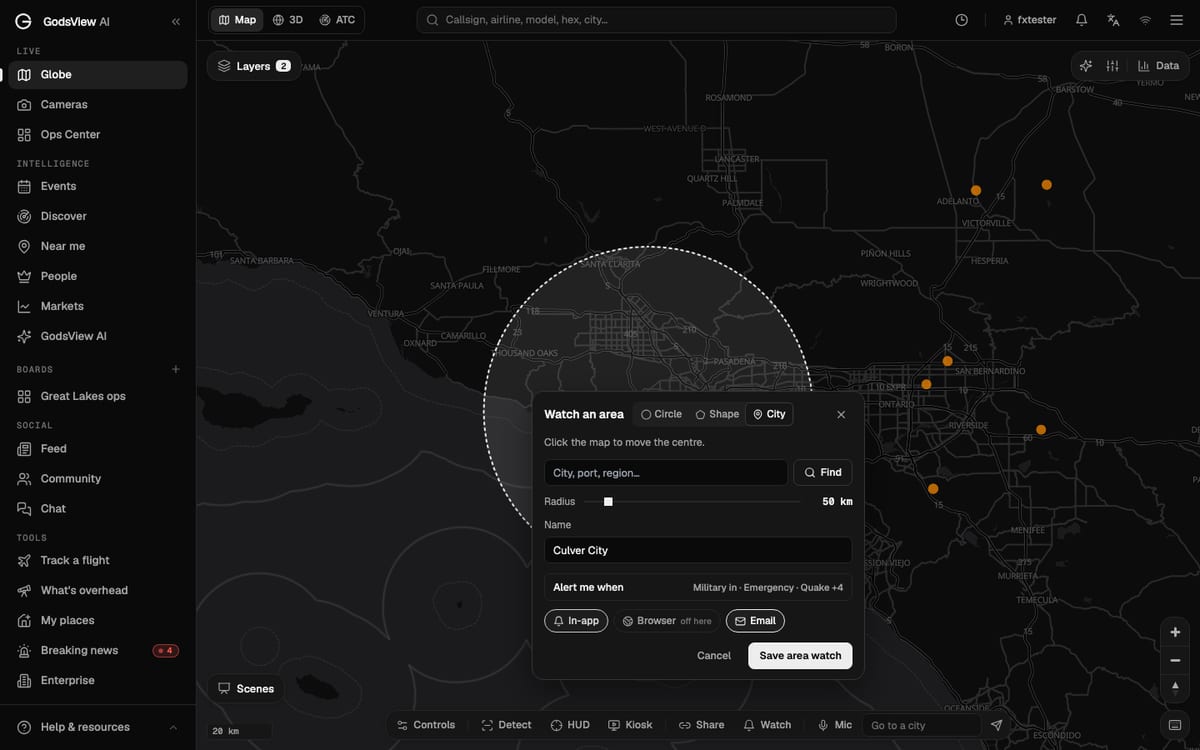
The alerts tutorial walks through the same steps with more screenshots.
How alerts reach you
Every alert goes to the bell icon at the top of the app. On top of that:
- Browser sends a push notification to this device. The first time, your browser asks for permission.
- Email is instant for high-severity alerts. Everything else goes into a digest, which you can set to hourly or daily, or turn off.
You control all of this from Watches & alerts (the gear icon in the bell panel), on the Delivery tab. The two settings I'd change straight away:
- Quiet hours. Set them for your night. Critical alerts still come through. A small earthquake two towns over at 3 AM can wait until breakfast.
- Send test. Press it once after you set things up, so you know the notifications actually reach you.
There's also Pause all alerts for when you're on holiday and don't want to hear about anything.
What it costs
Checking a place is free: anyone can type a town into My places and see whether anything happened there in the last three days. Saving watches and receiving alerts needs a paid plan, GodsView Plus or Pro. You can keep up to 50 watches.
If you're on a team that needs to watch sites together (offices, warehouses, ports), Pro adds Boards, which share places, alerts and a daily brief with everyone on the board.
Tips from using it for a while
- Add people, not just places. Name the place after who lives there. When an alert says "M5.1 near Mum and Dad", you know at once why it matters.
- Start with defaults, then trim. Run it for a week. If air quality alerts are too noisy for a city with regular smog, edit the watch and turn that rule off, or raise Only alerts at or above.
- Don't treat it as an emergency warning system. GodsView reports what official agencies publish, a few minutes after they publish it. For earthquake early warning, tsunami warnings and evacuation orders, keep your local official alerts switched on too. In the US that means Wireless Emergency Alerts and your county's alert system (FEMA).
- Use the map when an alert comes in. Open the live map with the matching layer on, and you can see the quake, the fire or the storm next to your place before you decide whether to call.
For storms in particular, how to watch a hurricane live explains the forecast cone and why being outside it doesn't mean you are safe.
Frequently asked questions
How do I get earthquake alerts for where my family lives?
Add their town on My places, choose Family and press Watch. GodsView alerts you about M4.5+ earthquakes within 50 km, plus storms, floods, wildfires and unhealthy air. For a different radius or magnitude, draw a watch area on the map instead.
Are GodsView alerts free?
Checking a place is free. Saving watches and getting alerts needs GodsView Plus or Pro.
How will I receive the alerts?
Always in the bell inside GodsView. You can also turn on browser push notifications and email. High-severity alerts are emailed at once; the rest can go into an hourly or daily digest.
Can I stop alerts at night?
Yes. Set quiet hours on the Delivery tab of Watches & alerts. Critical alerts still come through.
Does this replace official emergency alerts?
No. GodsView passes on what agencies like USGS, the National Weather Service and GDACS publish. Keep your phone's official emergency alerts and local warning systems switched on.