How-to
How to Watch a Hurricane Live: Tracks and Forecast Cones
A storm map shows three things: where the storm has been, where forecasters think its center will go, and how sure they are. Here is how to read each one, using a real typhoon on the map today.
Key takeaways
- A live storm map has three parts: the observed track (solid), the forecast track (dashed) and the forecast cone around it.
- The cone shows where the center of the storm will probably go. It says nothing about how wide the storm is, and damage often happens outside it.
- Categories follow the Saffir-Simpson scale on one-minute sustained wind: Category 1 starts at 119 km/h (74 mph), Category 5 at 252 km/h (157 mph).
- Forecast times are written in UTC, often as "Z": "Thu 12Z" is noon UTC on Thursday, not noon where you live.
- Watch the advisory time. Official forecasts are reissued every six hours, so a map can be a few hours behind the storm.
To watch a hurricane live, open a map that shows official storm tracks, click the storm, and read three things in order: the observed track behind it, the dashed forecast line ahead of it, and the cone drawn around that line. Then check when the last advisory was issued. That last step is the one most people skip, and it matters more than anything else on the screen.
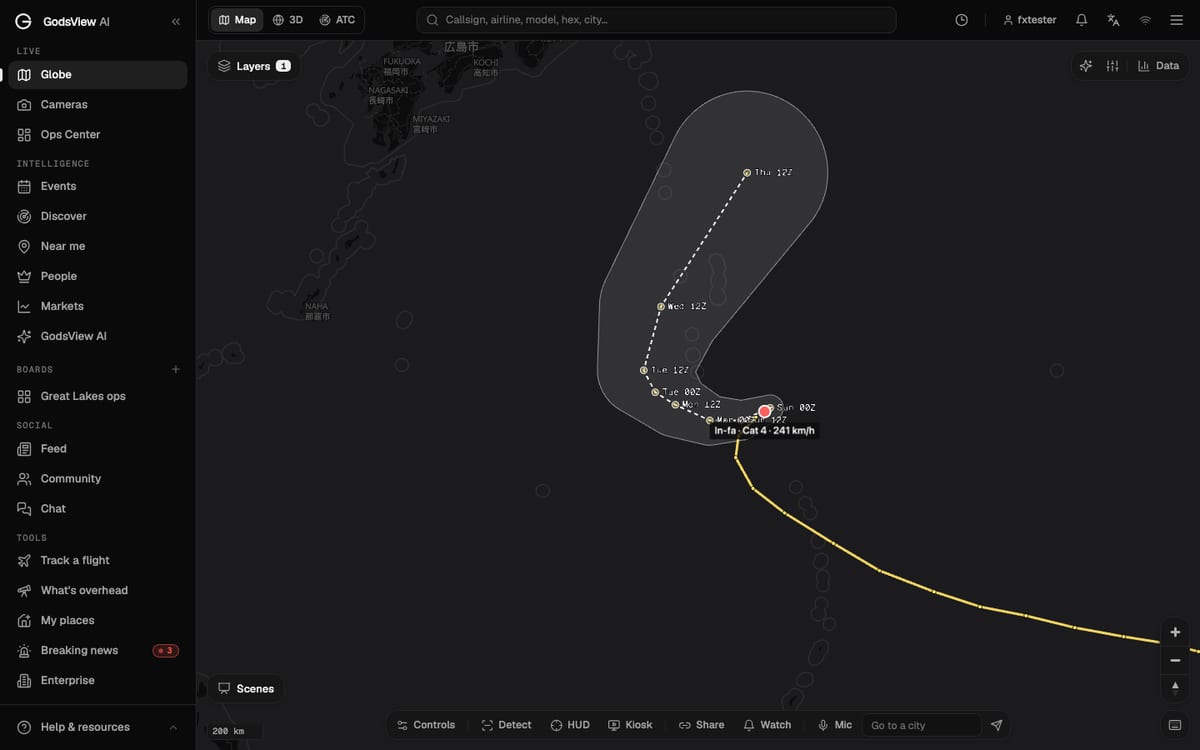
I'll walk through it with a real storm. As I write this on October 31, 2026, Super Typhoon In-fa is southeast of Japan with sustained winds of about 241 km/h (150 mph). Everything below is what you would see if you opened the live globe and turned on the storm layer today.
How to turn on live storm tracks
On GodsView, storms live in the Storm tracks layer. Open Layers at the top left of the map, type "storm" into the Find a layer box, and switch it on. It sits in the Weather group, it is free, and you don't need an account to see it.
Every active tropical cyclone on Earth shows up at once: hurricanes in the Atlantic and eastern Pacific, typhoons in the western Pacific, cyclones in the Indian Ocean and around Australia. They are the same kind of storm. The name only changes with the ocean basin.
If you want to see the storm itself and not just its track, also switch on Satellite clouds. That layer plays a loop of recent satellite images, so you can see the spiral and, for a strong storm, the eye.
What the lines on a storm map mean
A storm map looks busy, but there are only a few pieces.
| What you see | What it means | Where it comes from |
|---|---|---|
| Solid colored line | The observed track: where the center actually was at each fix | Best-track positions from the forecast agency |
| Dot with a label like "In-fa · Cat 4 · 241 km/h" | The current position, category and sustained wind | Latest advisory |
| Dashed line with dated dots | The forecast track of the center | Official forecast for the next 3 to 5 days |
| Labels like "Tue 12Z" | The time of each forecast point, in UTC | Same forecast |
| Grey shape around the dashed line | The forecast cone | Drawn around the forecast points |
On GodsView the observed line is colored by strength at each point, so you can see a storm strengthen or weaken along the way. Forecast points are drawn fainter than observed ones. That is on purpose: they are a forecast, not a record.
For In-fa today, the dashed line runs northwest toward Monday, bends north on Tuesday and Wednesday, and ends near 30.4°N, 143.2°E on Thursday at 12Z. That bend is called recurvature. Many western Pacific typhoons do it when they reach the westerly winds further north, and it is the reason a storm heading for one place can end up somewhere else.
How to read the forecast cone (and what it does not tell you)
The cone is the most misread shape in weather. It is not the size of the storm. It is not where the rain will fall. It is a picture of how far off past forecasts of the center's position have been.
The US National Hurricane Center explains how it builds its cone: it draws a circle around each forecast point, sized so that about two-thirds of its official forecast errors from the previous five years would fall inside it, then joins the circles up (NHC). That is why the cone is narrow near the storm and wide at the far end. A three-day forecast misses by more than a twelve-hour one.
Three things follow from that:
- The center leaves the cone about a third of the time. Two-thirds is a good forecast record, not a promise.
- Wind, rain and storm surge reach far beyond the cone. A large storm's damaging winds can extend hundreds of kilometers from the center. NHC says so in plain words on the same page.
- The middle of the cone is not the "real" path. The dashed line is the single most likely track, but places near the edge of the cone are still inside the forecast.
On GodsView the cone and forecast points come from the advisory data that GDACS publishes for each storm. GDACS republishes the official forecasts: NHC for the Atlantic and eastern Pacific, the Joint Typhoon Warning Center for the western Pacific. The storm panel tells you which agency wrote the forecast you're looking at.
Categories, wind speeds and why the numbers differ
Click the storm's dot and the data panel opens with the details. For In-fa it reads: Category 4, max wind 241 km/h (150 mph), moving NE at 15 km/h, alert level Green, areas at risk Japan and the Marshall Islands, last advisory October 31 at 12:00 UTC, advisory from JTWC.
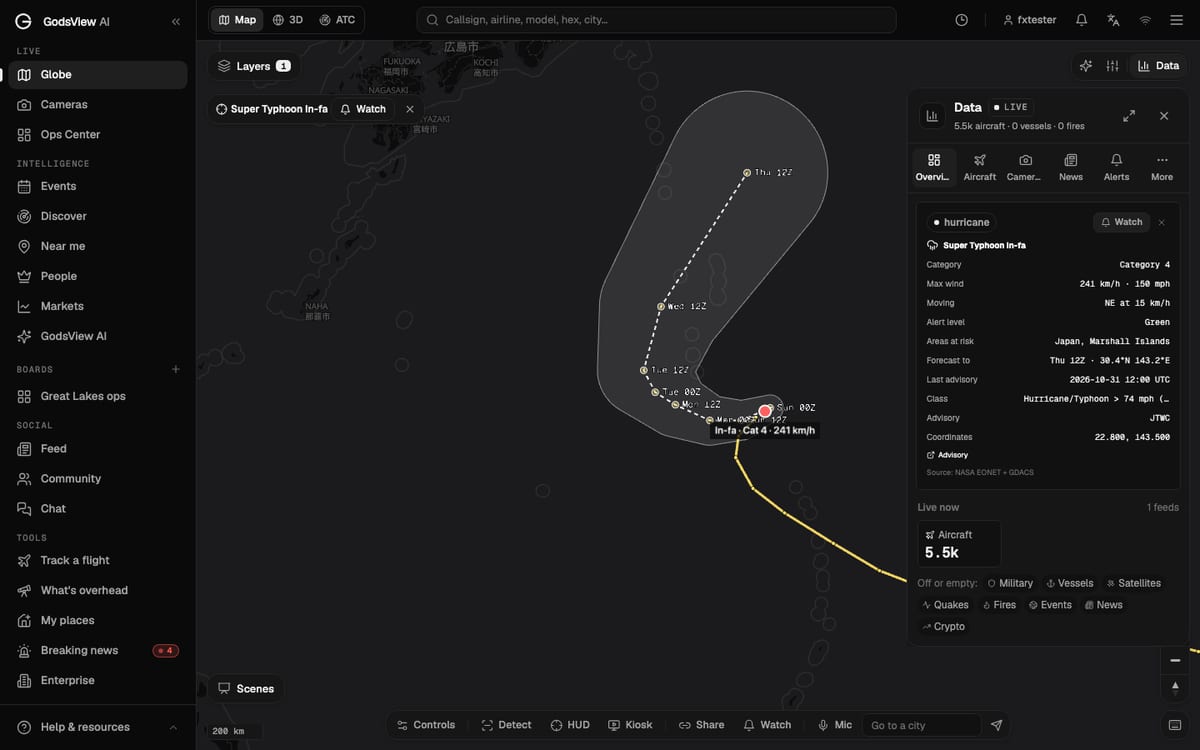
Categories use the Saffir-Simpson Hurricane Wind Scale, which only looks at sustained wind (NHC):
| Category | Sustained wind | Map color on GodsView |
|---|---|---|
| Tropical depression | Below 63 km/h (39 mph) | Light blue |
| Tropical storm | 63 to 118 km/h (39 to 73 mph) | Teal |
| Category 1 | 119 to 153 km/h (74 to 95 mph) | Pale yellow |
| Category 2 | 154 to 177 km/h (96 to 110 mph) | Yellow-orange |
| Category 3 | 178 to 208 km/h (111 to 129 mph) | Orange |
| Category 4 | 209 to 251 km/h (130 to 156 mph) | Red |
| Category 5 | 252 km/h (157 mph) and up | Magenta |
A few things trip people up here.
"Super typhoon" is not a sixth category. The Joint Typhoon Warning Center calls a typhoon "super" once its one-minute sustained wind reaches 130 knots, which is about 241 km/h. In-fa is right on that line, so it is a super typhoon and a strong Category 4 at the same time.
Different agencies measure wind differently. US agencies use one-minute averages. The Japan Meteorological Agency and most other basins use ten-minute averages, which come out lower for the same storm. If one site says 241 km/h and another says about 210 km/h, they may both be right.
Category is only about wind. Storm surge and rain kill more people than wind in most landfalls, and a slow Category 1 can flood a region worse than a fast Category 4.
Why a "Green" alert for a Category 4 storm?
The alert level on the panel comes from GDACS, and it measures something different from the category. GDACS estimates how many people and how much infrastructure sit in the storm's wind field, and rates the likely humanitarian impact Green, Orange or Red (GDACS).
In-fa is enormous and very strong, but today its center is over open ocean, far from big populations. So the impact estimate is low. If the forecast shifts toward Honshu, that level can jump in one advisory. Read the category as "how strong" and the alert level as "how many people are in the way".
Check the advisory time before you trust the map
Every number on a storm map is tied to an advisory. NHC issues full advisories every six hours, at 03, 09, 15 and 21 UTC, with extra updates when a storm threatens land. JTWC works on a similar cycle. Between advisories, the storm keeps moving and the map does not.
GodsView shows the time of the last advisory in the panel, and it nudges the current-position marker along the forecast line between fixes so it doesn't sit still for six hours. That estimate is useful for a glance. It is not a measurement.
So before you share a screenshot or make a plan, look for that timestamp. If it's more than six hours old, either the agency is late or the storm has weakened and stopped getting advisories. Either way, check the source agency's own page.
How to get an alert when a storm comes near you
Watching a map is fine for a storm you already know about. For the next one, set an alert.
- Open My places, add your home or a relative's town, and press Watch. GodsView checks a 50 km circle around each place for tropical cyclones, along with earthquakes, severe weather warnings, floods, wildfires and bad air.
- Or, on the map, press Watch at the bottom and draw a circle or shape around a whole coastline. In the rules, keep Tropical cyclone switched on.
- If you only care about the big picture, open Watches & alerts from the bell icon and pick Tropical cyclones under Worldwide events.
Alerts go to the bell in the app, and optionally to browser notifications and email. They need a paid plan. The step-by-step version, with screenshots, is in the alerts tutorial.
Where live storm data comes from
No live map makes its own hurricane forecast, and you should be wary of one that claims to. GodsView merges three public sources:
- NHC's current storms feed for the Atlantic and eastern and central Pacific.
- NASA EONET, which lists open severe-storm events worldwide with their recent positions (NASA EONET).
- GDACS, which adds the alert level, the countries at risk, the forecast track, the cone and the wind field for storms in every basin.
That gives you one map for every ocean. But the official word for your area is always the agency responsible for it: NHC in the Atlantic, JTWC and the Japan Meteorological Agency in the western Pacific, the India Meteorological Department in the north Indian Ocean, and your national weather service everywhere. The methodology page lists every source GodsView uses.
If you follow storms, you'll probably also end up watching the other hazards they set off. The earthquake map guide and the NASA FIRMS wildfire guide cover those the same way, and the events hub keeps a running list of active storms, quakes and fires.
Frequently asked questions
Where can I watch a hurricane live for free?
Open the GodsView globe, open Layers and switch on Storm tracks. Every active hurricane, typhoon and cyclone appears with its observed track, forecast track and cone. The layer is free and works without an account.
What does the hurricane cone mean?
The cone shows where the center of the storm will probably travel. Forecasters size it so that about two-thirds of past forecast errors fall inside it. It does not show the size of the storm, and strong winds, rain and surge often reach places outside it.
What does 12Z mean on a storm map?
Z stands for UTC (Zulu time). "Thu 12Z" means 12:00 UTC on Thursday. Convert it to your own time zone before you plan anything around it.
Is a typhoon the same as a hurricane?
Yes. Both are tropical cyclones. They are called hurricanes in the Atlantic and eastern Pacific, typhoons in the western Pacific, and cyclones in the Indian Ocean and South Pacific.
How often do hurricane forecasts update?
Full advisories come out every six hours, with extra updates when a storm threatens land. A storm map is only as fresh as its last advisory, so check the advisory time in the storm panel.
Can I get an alert when a hurricane comes near my home?
Yes. Add your home on My places or draw a watch area on the map, and keep the tropical cyclone rule on. Alerts go to the app and, if you choose, to your browser and email. They need a paid plan.
Sources
- National Hurricane Center: Definition of the NHC track forecast cone
- National Hurricane Center: Saffir-Simpson Hurricane Wind Scale
- GDACS: Global Disaster Alert and Coordination System
- Joint Typhoon Warning Center
- NASA Earth Observatory Natural Event Tracker (EONET)
Facts checked on against each provider's own site.