How-to
Can You Track a Flight by Passenger Name? What Works
You know who is flying but not which flight. No public tracker can search by name, and airlines will not read out a passenger list. The route that works starts with the traveler.
Key takeaways
- No public flight tracker can search by passenger name. Trackers see the aircraft's broadcast and schedule data, which carry a flight number, callsign and aircraft code, never a passenger list.
- Airlines hold passenger details in a booking record (PNR) that also contains contact, payment and passport data, so they treat it as private.
- The working method: ask the traveler for the flight number and date, or for the booking reference and last name if they want you to see the booking.
- Some airlines let a non-traveler sign up for delay and gate alerts on a flight. Air Canada does this through its app; Delta offers one-time flight notifications on delta.com.
- Once you have the flight number, any live tracker can show where the plane is. After an accident, US law requires the airline to run a toll-free line for families.
You cannot track a flight by passenger name. No public flight tracker has a name search, and airlines do not tell callers who is on a flight. What you can do is ask the traveler for their flight number and date, or for their booking reference and last name if they want you to see the booking. With the flight number you can follow the plane live, and with the airline's alerts you get delays and gate changes as they happen.
People search for a way to track a passenger on a flight for good reasons: a parent flying alone, a partner coming home, a colleague you need to collect. This guide explains why a name search does not exist, what the airline will and will not do, and the four steps that do work. It does not cover ways around anyone's privacy, because there are no legitimate ones.
Why can't you track a flight by passenger name?
Because the tracker never knows who is aboard. A live map is built from what the aircraft itself broadcasts: its position, altitude, speed, its callsign and a six-character aircraft code. Our explainer on how ADS-B flight tracking works shows each field in the message. A passenger list is not one of them.
Schedule data adds the flight number, the airports and the times, but still no names. FlightAware says in its FAQ that you can usually track a flight by "the flight identifier (e.g., ABC123) or the registration number (e.g., N12345)," and that flight plan details such as the pilot's name and the number of people on board are not displayed (FlightAware FAQ). Every public tracker works the same way, including GodsView.
So the question changes from "where is this person?" to "which flight is this person on?" Only the traveler, or whoever booked the trip, can answer that.
| What you have | What you can do | Where |
|---|---|---|
| Only the person's name | Ask them, or whoever booked, for the flight number | Message or call the traveler |
| Flight number and date | Follow the plane live, see delays and landing time | Track a flight or the live flight tracker |
| Booking reference and last name, shared by the traveler | See the itinerary in the airline's manage booking page | The airline's website or app |
| Flight number and an airline app | Get delay and gate alerts, where the airline offers them | The airline's notification service |
| Fear that a loved one was on a flight in an accident | Call the airline's family assistance number | Published by the airline after an accident |
Why airlines won't say who is on a flight
When someone books a ticket, the airline's reservation system creates a passenger name record, or PNR. It holds far more than a name: date of birth, contact details, payment and ticket data, seat, passport details, emergency contacts and special requests such as meals or wheelchair help (Wikipedia: Passenger name record). Some of those requests describe medical conditions or religious meals, which EU law treats as sensitive personal data.
Confirming that a named person is on a named flight would hand a stranger part of that record: where someone will be, and when. That is why airline websites open a booking only with the booking reference and the passenger's last name, and why you should not expect an answer to "is my friend on flight 123?" Airlines publish privacy policies covering how they use passenger data, and they share PNR data with governments under specific agreements, such as those between the EU, the US, Canada and Australia, not with the public.
The one exception: accidents
After an air accident, the rules flip in favor of families. Under US law, an airline's family assistance plan must publicize "a reliable, toll-free telephone number" with staff to handle calls from families. The airline must notify a passenger's family as soon as it has verified the passenger was aboard, and must tell families on request whether a name appeared on the preliminary passenger manifest (49 U.S. Code § 41113). The NTSB coordinates the federal side of this under the Aviation Disaster Family Assistance Act of 1996 (NTSB).
If you think a loved one was on a flight that has had an accident, call that number. Do not rely on a map or social media.
Step 1: Ask the traveler for their flight details
The shortest path is a message: "What's your flight number and date?" Everything else depends on it.
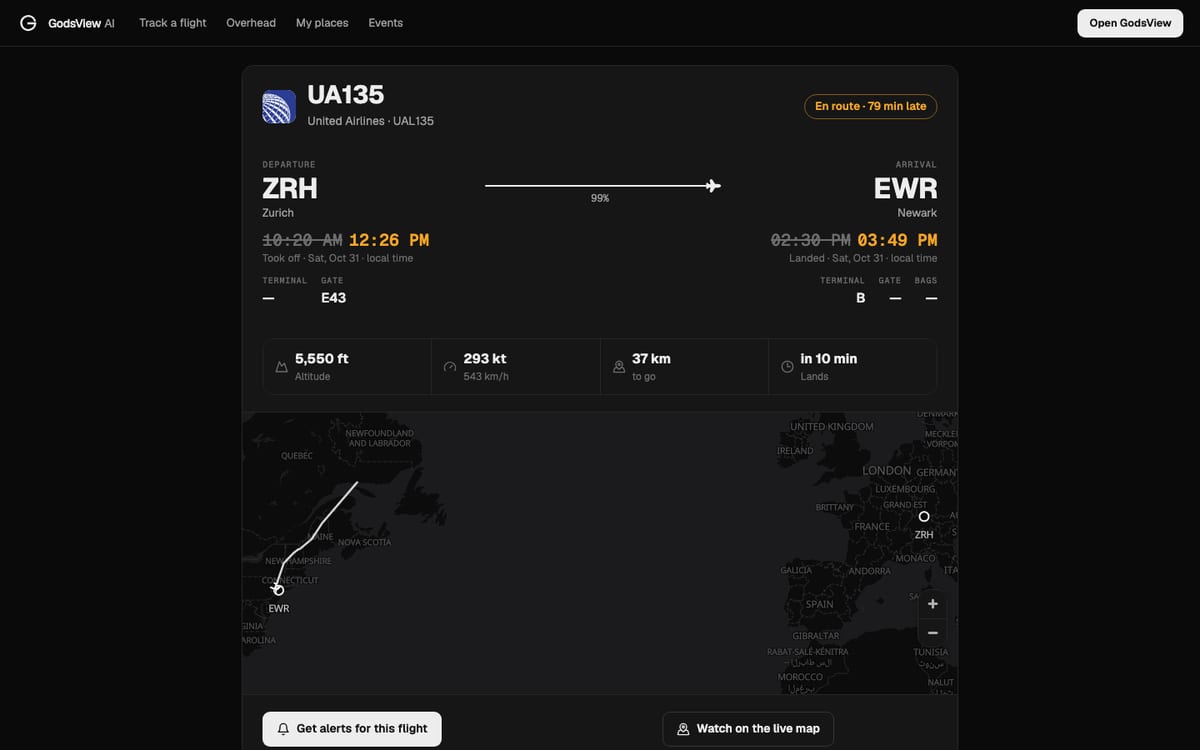
The flight number is on the booking email, the boarding pass and the airline app, and looks like AC 856, DL 40 or UA 135: a two-character airline code and a number. Ask for the date too, because the same number flies every day. If the trip has a connection, ask for every flight number, since each leg is a separate flight.
If the traveler is a child, an older parent or someone not comfortable with apps, ask whoever booked the trip. The booking email has every flight number in one place.
Step 2: Use the airline's manage booking page, with their permission
If the traveler wants you to see the whole trip, they can share their booking reference and last name. Airlines use these two items to open a booking online. Air Canada, for example, asks for the booking reference and last name to manage a booking, and lets you print or share the itinerary and add it to a calendar (Air Canada). The booking reference is the six-character record locator the reservation system issues; it stays the same if the booking changes (Wikipedia).
Two cautions:
- Only with consent. The same two items let someone change seats, add bags or cancel. Opening another person's booking without their permission is not tracking, it is access to their account.
- Prefer the itinerary. Most airlines let the traveler email or share the itinerary itself. That gives you the flights and times without the power to change anything.
Step 3: Sign up for the airline's flight alerts
Several airlines let people who are not flying get notifications about a flight. The details differ, so check the airline's own page.
- Air Canada automatically enrolls passengers when they book. If you are not travelling, you can download the Air Canada app and sign up there. Alerts go out by text message and in the app for cancellations, delays of 15 minutes or more and, within two hours of departure, gate changes; no alert is sent for an on-time flight (Air Canada notification services).
- Delta lets customers register for a One-Time Flight Notification on a specific flight from the Flight Status and Notifications page on delta.com, using the bell icon where it is available. Delta's notifications go by email, text or phone call (Delta).
These alerts tell you about the flight, not the person. They will say the flight is delayed, not whether your friend boarded it.
If you would rather have one place for every airline, GodsView's paid plans add alerts on a flight for gate changes, delays, takeoff and landing; see pricing.
Step 4: Track the flight number live
With the flight number, the rest is easy. Type it into Track a flight on GodsView, the way it is printed on the ticket, such as UA135. The page shows status, departure and arrival times, gates where the airline publishes them, altitude, speed, distance to go and the estimated landing time. You don't need an account to view it, and the share row sends the live page to anyone else who is waiting.
To see the aircraft among other traffic, press Watch on the live map, or search the live flight tracker by callsign or airline name. A live map shows the ICAO callsign, so UA135 appears as UAL135; what a flight call sign is explains the conversion.
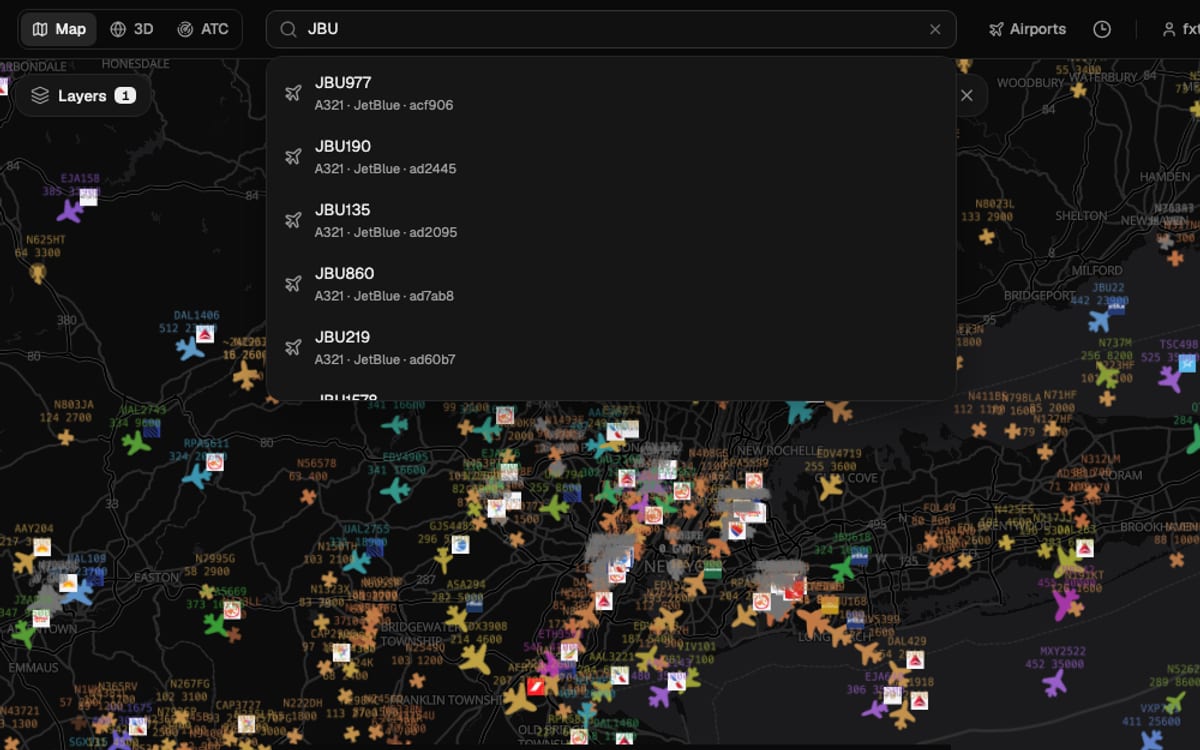
If you are collecting someone, the airport page is handy for the last part of the trip: Toronto Pearson, London Heathrow and JFK each open the live map around the airport.
What the live map can and can't show
GodsView uses ADS-B. A plane appears while it is broadcasting and a receiver can hear it, so there can be gaps over oceans and remote areas, and an aircraft at the gate may not show at all. The map tells you where the aircraft is. Gates, baggage belts and whether a particular passenger boarded come from the airline. For delays, our guide on how to check flight delays covers the official sources.
What not to do
Some websites promise to find "any passenger on any flight". Passenger lists are not public data, so no such service can do this legitimately. Do not use them, and do not give them payment or personal details.
Also skip guessing booking references, calling an airline while pretending to be the traveler, or watching a private aircraft to learn where a person is going. Aircraft owners in the US can limit what is shown about them: the FAA's LADD program blocks aircraft data in the FAA data feed, and its Privacy ICAO Address program is intended to limit how quickly an aircraft can be identified from inexpensive receivers (FAA PIA). If a person has not told you their flight, the respectful step is to ask them.
For the legal side of public flight data, see is flight and ship tracking legal?.
The short version
There is no passenger name search on any flight tracker, and airlines keep passenger lists private except to families after an accident. To follow someone's trip, ask them for the flight number and date, use the booking reference and last name only if they share it, sign up for the airline's alerts, and watch the flight live. Start with the flight number on Track a flight, and read how to track a flight if the search comes back empty.
Frequently asked questions
Can I track a flight with just the passenger's name?
No. Public flight trackers, including GodsView and FlightAware, search by flight number, callsign, registration or aircraft code. They never receive passenger lists. Ask the traveler, or whoever booked, for the flight number and date, then search that on Track a flight.
Will an airline tell me if someone is on a flight?
Usually not. A booking record holds contact, payment and passport details, so airlines treat it as private and talk about a trip only with someone who has the booking reference. The exception is an accident: US law requires the airline to run a toll-free line and to tell families whether a passenger's name was on the preliminary manifest.
How can I check if my family member boarded their flight?
Ask them to message you when they board. A flight tracker shows the aircraft, not who is on it, and airline flight alerts cover delays and gate changes, not individual passengers. If they shared their booking reference and last name, the airline's manage booking page shows the itinerary.
Can I get flight alerts if I am not the passenger?
Some airlines allow it. Air Canada lets non-travellers sign up in its app for delay, cancellation and gate change alerts, and Delta offers one-time flight notifications on delta.com. GodsView's paid plans add alerts for takeoff, landing, delays and gate changes on any flight; see pricing.
Why can't I find the flight on a live map?
The map shows the ICAO callsign, so UA135 appears as UAL135. The flight may also be on the ground, outside receiver coverage over an ocean, or flying under a different callsign. How to track a flight explains each case.
Sources
- FlightAware — Frequently asked questions (identifiers, personal data not displayed)
- Wikipedia — Passenger name record
- Cornell LII — 49 U.S. Code § 41113, plans to address needs of families of passengers
- NTSB — Federal family assistance legislation (aviation)
- Air Canada — FAQ, managing a booking online
- Air Canada — Flight notification services
- Delta — Delta Messenger and one-time flight notifications
- FAA — ADS-B Privacy ICAO Address (PIA) program and LADD
Facts checked on against each provider's own site.