Guide
Weather Alerts in My Area: How to See Active Warnings Now
The fastest way to know whether an official weather alert covers you right now, and how to make sure the serious ones reach your phone even when you are not looking.
Key takeaways
- To see the weather alerts in your area right now, open GodsView's weather warnings page and tap Warnings for my location, or go straight to your city, for example /weather-warnings/new-york-city. No sign-in is needed.
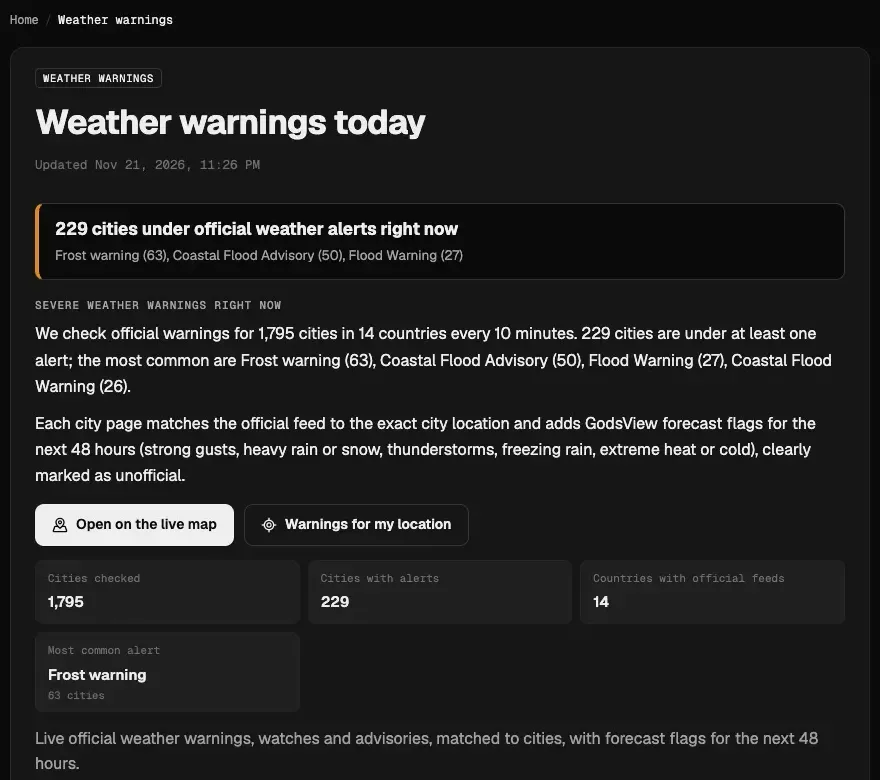
- GodsView checks official feeds for 1,795 cities in 14 countries every 10 minutes, including the US National Weather Service, Environment Canada, the Met Office, DWD and KNMI.
- The most dangerous US warnings, such as tornado, extreme wind and the most serious flash flood warnings, reach phones automatically as Wireless Emergency Alerts. There is nothing to sign up for.
- NOAA Weather Radio has more than 1,000 transmitters and works when the power and the phone network are down.
- On GodsView Plus ($10.99 a month or $99.99 a year), saved places get alerts for severe and extreme US weather warnings, plus earthquakes, floods, wildfires and bad air.
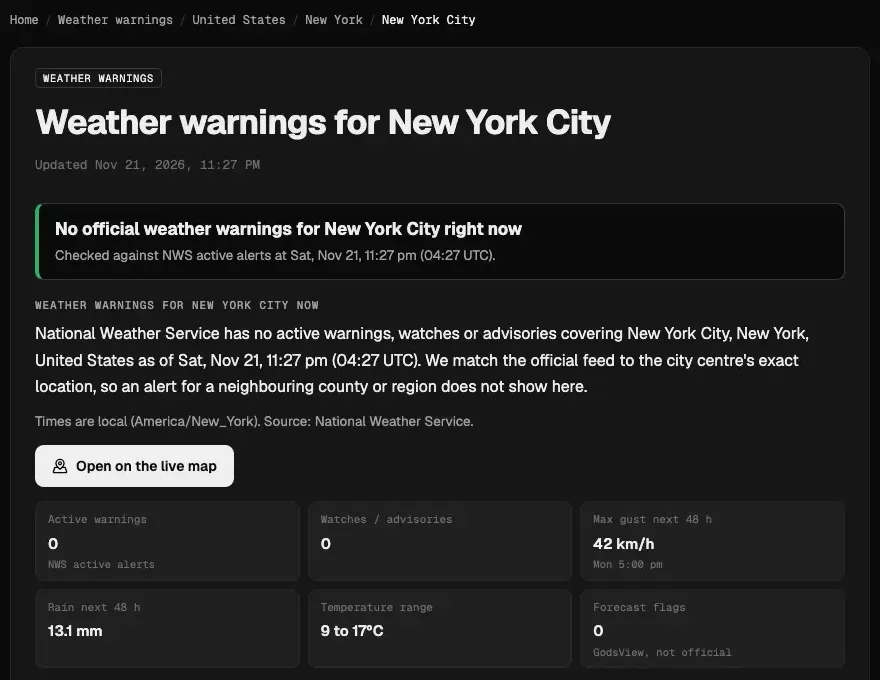
To see the weather alerts in your area right now, open GodsView's weather warnings today page and press Warnings for my location, or go straight to your city: for example weather alerts for New York City, Brooklyn or Indianapolis. Each page lists every official warning, watch and advisory that covers the city centre, with its level, area and end time, from the national weather service's own feed. Then make sure your phone's emergency alerts are switched on, so the most dangerous warnings find you even when you are not checking.
This guide is about the practical side: where the alerts for your exact spot come from, how to check them in under a minute, and how to get them pushed to you. If you want to know what the words mean, our guide to weather watch vs warning explains the levels and the colour codes.
Check the warnings for my city
The one-minute check: is there a weather alert where I am?
- Open godsviewai.com/weather-warnings on your phone or computer.
- Press Warnings for my location and allow location once. The page finds the nearest city on our list and opens its warnings page. If you would rather not share location, scroll down and pick your city.
- Read the box at the top. It says either No official weather warnings right now with the time it checked, or how many alerts are active and which ones.
- Look at the nearby cities table under it. GodsView matches each alert to the exact location of the city centre, so an alert for the county next door does not show on your city's page. The nearby list catches those.
- For anything active, open the agency link on the page and follow what your national weather service and local officials say.
These pages are public. You don't need an account, an app or a payment to read them.
Where the alerts for your area come from
Every country has one official source of weather warnings, and every reliable app or website repeats it. GodsView reads the feeds directly, matches them to city locations, and shows when it last checked. As of November 21, 2026, the weather warnings hub covers 1,795 cities in 14 countries:
| Where you live | Official source | How GodsView gets it | Refresh |
|---|---|---|---|
| United States | National Weather Service | NWS active alerts API, matched to the city point | City pages cached about 3 minutes |
| Canada | Environment and Climate Change Canada | ECCC public weather alerts (polygons) | About 5 minutes |
| Germany | Deutscher Wetterdienst | DWD warnings by municipality | About 5 minutes |
| UK, Netherlands, Norway, Sweden, Switzerland, Iceland, Slovenia, Estonia, Latvia, Ukraine, Israel | Met Office, KNMI and the other national services | MeteoAlarm CAP warnings with areas | About 10 minutes |
For other countries, each city page still links to the national agency, such as the Bureau of Meteorology in Australia or the India Meteorological Department, but it does not show a live alert count.
On top of the official alerts, each city page shows GodsView forecast flags: strong gusts, heavy rain or snow, thunderstorms, freezing rain, extreme heat or cold in the next 48 hours from the Open-Meteo forecast model. They are clearly marked as unofficial. They tell you something may be coming before a warning is issued; they never replace one.
Weather alerts in NYC and other big US cities
New York searches for weather alerts spike before nor'easters, coastal floods and summer storms. The NWS office that covers the five boroughs is the New York, NY office in Upton, on Long Island, and its alerts are what you see on GodsView's New York City page and the borough pages such as Brooklyn and Manhattan. Coastal flood advisories and warnings are common along the harbour and the south shore, so check the nearby list for Hoboken, Jersey City and Bayonne too.
New York City also runs Notify NYC, the city's free emergency notification service, which sends alerts about emergencies, significant events, public health notices and school closings by text, email, phone call or app; you can sign up at nyc.gov/notifynyc, by calling 311, or by texting NOTIFYNYC to 692-692. It complements the NWS feed with city instructions, such as when emergency shelters open.
The same pattern works in any US city: pick the city page, check the nearby list, then read the state page, for example all alerts in New York State or Indiana. The United States page shows the whole country.
See every alert of one type, nationwide
Sometimes the question is not "what about my town" but "is there a tornado warning anywhere near here" or "who is under a flood warning today". GodsView has a live page for each common NWS alert type, listing every active one by state with its counties, issue time and expiry:
- Tornado warnings right now and tornado watches
- Severe thunderstorm warnings
- Flood warnings and flash flood warnings
- Winter storm warnings and winter weather advisories
- Dense fog advisories, which our fog warning guide explains
For a moving picture, the same alerts sit on the live map. Open the God's eye view of the world, live, switch on the weather alerts layer, and you can see warning areas next to storm tracks, earthquakes, fires and live flights. The map needs a free account; weather radar is a GodsView Plus layer.
Get alerts on your phone without checking
Checking a page works when you are awake and thinking about the weather. For the dangerous warnings, you want them to find you.
Wireless Emergency Alerts (US)
The NWS sends its most urgent warnings to phones as Wireless Emergency Alerts (WEA). According to the NWS, these include tsunami, tornado, extreme wind, hurricane, typhoon, storm surge, dust storm and snow squall warnings, severe thunderstorm warnings when the damage threat is "destructive", and flash flood warnings when the damage threat is "considerable" or "catastrophic". No sign-up is needed, the service is free, and alerts reach phones in the warned area by cell tower, not by your home address.
Check they are on:
- iPhone: Settings, then Notifications, then scroll to Government Alerts and switch on Emergency Alerts (and Public Safety Alerts if you want them).
- Android: Settings, then Safety and emergency (or Notifications, depending on the maker), then Wireless emergency alerts, and switch on Extreme threats and Severe threats.
Leave them on. Muting them is the most common reason people miss a tornado warning at night.
NOAA Weather Radio
NOAA Weather Radio All Hazards broadcasts NWS forecasts and warnings around the clock from more than 1,000 transmitters covering all 50 states, coastal waters and US territories. A radio with SAME (Specific Area Message Encoding) can be set to your county so it only sounds the alarm for alerts that cover you. It runs on batteries, which matters when a storm has knocked out power and the phone network.
Other countries
- Canada: alerts come from Environment and Climate Change Canada. Since November 26, 2025 they are colour coded yellow, orange or red by expected impact, as in "Yellow Advisory - Fog". The most dangerous ones are also broadcast through the national Alert Ready system to TV, radio and compatible phones. See Canada's live warnings.
- United Kingdom: the Met Office issues yellow, amber and red warnings. The government's Emergency Alerts system can send a loud alert to phones for life-threatening situations. See UK warnings.
- Europe: national services publish their warnings on MeteoAlarm in the same yellow, orange and red levels, and most EU countries also run cell broadcast public warning systems, such as NL-Alert in the Netherlands.
- Australia: the Bureau of Meteorology issues weather warnings; fire and emergency services use the Australian Warning System levels Advice, Watch and Act, and Emergency Warning.
Alerts for home, family and the places you care about
Phone alerts follow your phone. If you also want to know when something hits your home while you are away, or your parents' town, save those places.
On GodsView, add a place on My places or draw a watch area on the map. A new place comes with sensible rules switched on: a severe weather warning rule for US NWS warnings rated severe or extreme, earthquakes, floods, wildfires, tropical storms and poor air quality. Alerts arrive in the app, by browser push or by email.
Two limits so you know what to expect. The weather rule uses the US National Weather Service feed, so for places outside the US use the city warnings pages and your national service's own app. And saved-place alerts need GodsView Plus ($10.99 a month or $99.99 a year, as of November 21, 2026) or Pro; checking the warning pages is free. The disaster alerts near home guide walks through the setup.
Why your app and the official page sometimes disagree
- Location matching. Alerts are drawn for counties, zones or polygons. An app that uses your ZIP code centroid, your phone's GPS or the city centre can land on either side of a boundary. GodsView uses the city centre and shows nearby cities so you can see the edge.
- Timing. Every service caches. GodsView city pages show the exact time they checked, and the hub refreshes about every 10 minutes. If a warning was issued a minute ago, the NWS or your national service will have it first.
- Forecast vs official. Many weather apps show their own "severe weather" banners from model forecasts. Those are not warnings. On GodsView they are labelled forecast flags, not official.
- Expired alerts. Some apps keep showing an alert until its scheduled end even if the agency cancelled it early. The official feed is the reference.
For anything that affects safety, the national weather service and your local emergency officials have the final word.
When an alert arrives: what to do in the first minute
- Read the type and the level. A warning means act now; a watch means get ready. The watch vs warning guide covers each level.
- Check the area and the end time. Is your exact location inside it, and until when?
- Follow the instruction in the alert. Tornado: go to shelter. Flash flood: get to higher ground and never drive through water. Fog: slow down and use low beams.
- Tell the people who need to know. Share the city page link with family who are nearby.
- Keep checking. Warnings are updated, extended and upgraded. Power cuts often follow storms, and our power outages map shows them by state and county in the US.
For tropical storms, the hurricane tracking guide explains the cone and the advisories.
The short version
For the weather alerts in your area right now, open weather warnings today and press Warnings for my location, or go straight to your city page. Turn on Wireless Emergency Alerts on your phone, keep a NOAA Weather Radio if you live in tornado or hurricane country, and save your home and family's towns on GodsView Plus if you want alerts for them too.
Frequently asked questions
How do I see the weather alerts in my area right now?
Open GodsView's weather warnings page and press Warnings for my location, or pick your city. Each city page lists every official warning, watch and advisory that covers it, with its level and end time, and says when it last checked. In the US you can also enter your ZIP code on weather.gov.
Are there any weather alerts in NYC today?
Open the New York City weather warnings page. It checks the National Weather Service's active alerts for the city and shows any that are in effect, plus nearby cities such as Brooklyn, Jersey City and Hoboken. New York City's free Notify NYC service also sends local emergency alerts.
How do I get weather alerts on my phone?
In the US, the most dangerous NWS warnings arrive automatically as Wireless Emergency Alerts with no sign-up; make sure Emergency Alerts are switched on in your phone settings. For your saved places, GodsView Plus sends alerts for severe US weather warnings, earthquakes, floods, wildfires and bad air by app, push or email.
Why did my phone not get a weather alert?
Wireless Emergency Alerts are sent only for the most serious warning types, such as tornado and extreme wind warnings and the most dangerous flash flood warnings. Many other warnings, watches and advisories never go to phones. Alerts may also be switched off in settings, or your phone may have connected to a tower outside the warned area.
Is the GodsView weather warnings page free?
Yes. The weather warnings pages, city pages and alert type pages are free and need no account. The live map needs a free account. Alerts for saved places and weather radar are part of GodsView Plus at $10.99 a month or $99.99 a year.
Which countries does GodsView cover for weather warnings?
As of November 2026, live official feeds for 14 countries: the United States, Canada, Germany, the United Kingdom, the Netherlands, Norway, Sweden, Switzerland, Iceland, Slovenia, Estonia, Latvia, Ukraine and Israel. Other city pages link to the national weather service.
Sources
- National Weather Service — Wireless Emergency Alerts
- National Weather Service — NOAA Weather Radio All Hazards
- National Weather Service — API web service (active alerts)
- Government of Canada — Colour-coded weather alerts
- Met Office — UK weather warnings
- MeteoAlarm — warnings from European national weather services
- NYC Emergency Management — Notify NYC
Facts checked on against each provider's own site.